You send a text on your iPhone and the bubble comes back green instead of blue. Instantly, your brain starts running through the worst-case scenarios. Did they block me? Is something wrong with my phone? Are my messages even going through?
Relax. The green text bubble is one of the most misunderstood features on any iPhone — and in most cases, it is completely harmless. This guide covers every possible reason your messages turn green, what it actually means, how to fix it, and when (if ever) it signals something more serious.
What Do Green and Blue Messages Mean on iPhone?
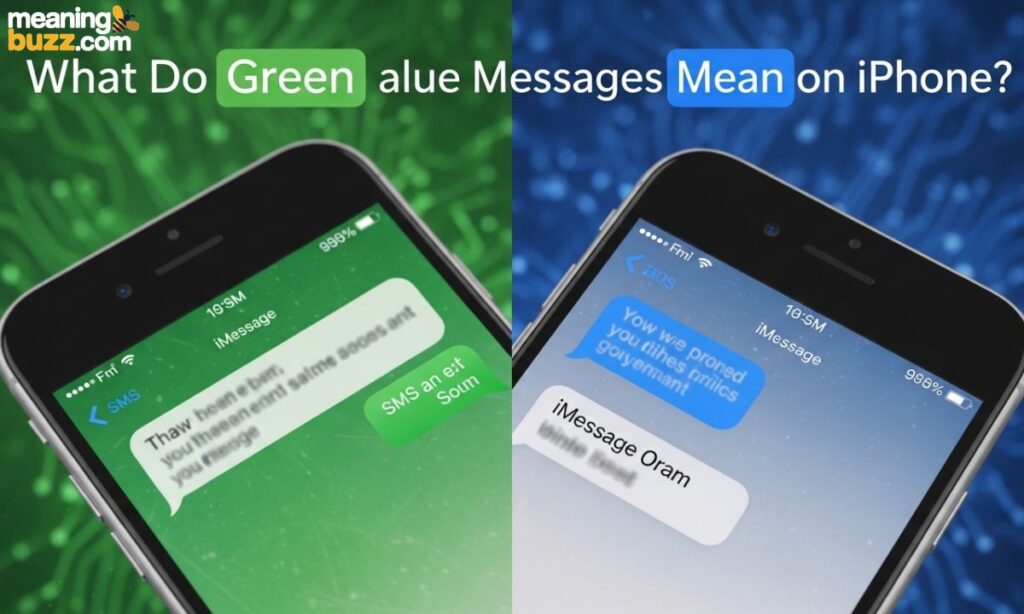
Apple’s Messages app uses two distinct messaging systems, and the bubble color tells you which one is active.
Blue Messages (iMessage)
Blue bubbles mean your message was sent through iMessage — Apple’s own internet-based messaging service. It works between Apple devices only: iPhone, iPad, and Mac. iMessage requires either Wi-Fi or cellular data to function, and it delivers features like read receipts, typing indicators, message reactions, and end-to-end encryption.
Green Messages (SMS/MMS)
Green bubbles mean your message was sent as a standard SMS (Short Message Service) or MMS (Multimedia Messaging Service) text — the same technology that has existed since the 1990s. SMS runs through your mobile carrier, not the internet. It works on every phone regardless of brand, but it lacks the extra features that iMessage provides.
A quick comparison:
| Feature | iMessage (Blue) | SMS/MMS (Green) |
| Works between | Apple devices only | All phones |
| Requires internet | Yes (Wi-Fi or data) | No (cellular signal only) |
| End-to-end encryption | Yes | No |
| Read receipts | Yes | No (usually) |
| Typing indicator | Yes | No |
| Character limit | None | 160 per message |
| Cost | Free | Depends on carrier plan |
Does a Green Text Message Mean You Are Blocked?
This is the question everyone wants answered. Here is the direct truth: green messages do not automatically mean you are blocked.
Being blocked can cause messages to turn green because your iMessage can no longer reach the recipient through Apple’s servers, so your phone falls back to SMS. However, green texts happen for many other completely ordinary reasons — no internet connection, iMessage turned off, Android device on the other end, or a temporary Apple server issue.
The signs that could suggest blocking alongside a green bubble:
- No “Delivered” status appears under the message
- No “Read” receipt ever shows up
- Phone calls go directly to voicemail every single time
- You previously had blue messages with this person and they turned green suddenly
Even then, none of this is definitive proof of being blocked. The only way to truly confirm it is to ask someone else to reach out to that person on your behalf.
Why Are My Messages Green For One Person
If your messages are green specifically with one contact but blue with everyone else, the problem is almost certainly on their end rather than yours. That one person may have turned off iMessage, lost their internet connection, switched to an Android phone, or temporarily lost cellular signal.
iMessage is smart enough to fall back to SMS when it cannot reach a contact through Apple’s system. So when green appears for just one person, your iMessage is working perfectly fine — it just cannot connect to them through Apple’s network at that moment.
Also read What Does BSF Mean in Text Messages: 9 Shocking but Sweet Facts You Must Know in 2026
Why Are My Messages Green When They Should Be Blue?
Several things can interrupt iMessage and force your iPhone onto SMS. Here are the most common culprits:
1. iMessage Is Turned Off
Someone toggled iMessage off in their settings — either you or the recipient. This is the most common fix and the first thing to check.
2. No Internet Connection
iMessage requires a live internet connection. No Wi-Fi, no data, no iMessage. Your phone switches to SMS automatically.
3. Apple Server Issues
Apple’s iMessage servers occasionally go down or experience outages. When this happens, all iMessages fail and fall back to SMS until the servers recover.
4. Incorrect iMessage Settings
Your phone number or Apple ID may not be correctly registered with iMessage, especially after setting up a new device or changing your phone number.
5. The Recipient Turned Off iMessage
Even if your iMessage is perfectly active, if the person you are texting has disabled theirs, your message will arrive as an SMS (green) on their end.
How to Fix Green Messages to Blue on iPhone
1. Turn iMessage On
Go to Settings > Apps > Messages > and toggle iMessage on. If it is already on, toggle it off, wait 10 seconds, and turn it back on.
2. Check Internet Connection
Make sure you have active Wi-Fi or cellular data. Open Safari and try loading a page to confirm your connection is working.
3. Restart Your iPhone
A simple restart clears temporary glitches that may be interrupting iMessage. Hold the side button and volume button, slide to power off, then turn it back on.
4. Sign Out and Back Into iMessage
Go to Settings > Messages > Send & Receive > tap your Apple ID > Sign Out. Wait a minute, then sign back in. This refreshes your iMessage registration.
5. Check Apple System Status
Visit Apple’s System Status page (apple.com/support/systemstatus) to see if iMessage is experiencing an outage. If there is a yellow or red indicator next to iMessage, the issue is on Apple’s end and you simply have to wait.
Why Are Some Texts Blue and Some Green
If your conversation shows a mix of blue and green bubbles, it means the messaging type switched mid-conversation. This is common and completely normal. It happens when:
- The other person temporarily lost internet mid-conversation
- They moved between Wi-Fi and cellular data
- iMessage briefly went down and then came back
- You sent a message while offline and it defaulted to SMS
Your iPhone handles this automatically. It always tries iMessage first, and falls back to SMS only when iMessage is unavailable.
How Do You Know if a Green Text Message Was Delivered on iPhone?
Green SMS messages typically do not show a “Delivered” status the way iMessages do. Whether you see any delivery confirmation depends on your carrier. Some carriers support SMS delivery reports; most do not by default.
If your green message has no status below it at all — no “Delivered,” no “Read” — it does not mean the message failed. It likely just means your carrier is not providing that feedback. If the message failed entirely, your iPhone will display a red alert and a “Not Delivered” notice.
Why Is My Text Bubble Green
Your text bubble is green because your iPhone sent that message as an SMS instead of an iMessage. This is not an error. It is a fallback system designed to make sure your message gets through even when iMessage cannot be used. The message almost always arrives — it just travels through your carrier’s network instead of Apple’s.
Green Message iPhone: Common Questions
Why did my iPhone messages suddenly turn green? The most likely causes are iMessage being disabled, a lost internet connection, or a temporary Apple server outage.
Can an iPhone send green messages to another iPhone? Yes — if either phone has iMessage turned off or lacks an internet connection, the message sends as SMS (green) even between two iPhones.
Do green messages mean someone blocked you? Not necessarily. Blocking is only one of many reasons messages turn green, and it is rarely the most likely explanation.
Why are my texts green when texting another iPhone? Check that both devices have iMessage enabled and an active internet connection. If one person turned off iMessage or has no data, green messages will appear even between iPhones.
What Is Green Text Meaning on iPhone? (Primary Meaning)
In plain terms: a green text bubble on iPhone means the message was sent as a standard SMS or MMS through your mobile carrier, not through Apple’s iMessage system.
That is the whole story at its core. Everything else — blocking theories, delivery concerns, privacy differences — flows from that single fact.
Chat-Style Examples
Alex: “Why are your messages coming up green?” Jordan: “Oh I turned off iMessage by accident 😭 fixing it now”
Sam: “Your texts are green today” Riley: “I’m traveling and barely have signal, sorry!”
What Does Green Text Mean iPhone Reddit
Reddit users frequently discuss green texts with anxiety, assuming it means they are blocked. The consensus among experienced iPhone users on threads across r/iPhone and r/AppleHelp is consistent: green means SMS, not necessarily blocking. The most upvoted explanations always point to iMessage being disabled, no internet connection, or an Android recipient before even mentioning the blocking possibility.
Why This Green Text Meaning on iPhone? Tone and Emotion
The emotional reaction to green texts is fascinating. Most people feel a small spike of worry when blue suddenly turns green. That reaction comes from associating green with “something is wrong” — but in most cases, it is simply a technical switch between two messaging systems. Once you understand what it means, the anxiety disappears.
Green vs Blue Text iPhone
| Category | Green (SMS/MMS) | Blue (iMessage) |
| Network used | Mobile carrier | Apple servers via internet |
| Works with Android | Yes | No |
| Encryption | No | Yes (end-to-end) |
| Read receipts | No | Yes (if enabled) |
| Photo quality | Compressed (MMS) | Original quality |
| Typing dots | No | Yes |
| Scheduling messages | No | Yes |
| Message reactions | No | Yes |
| Could mean blocked | Possibly | No |
Other Reasons Messages Turn Green
1. The Person Is Using Android
The most common reason by far. iMessage only works between Apple devices. If your contact switches to a Samsung, Pixel, or any Android phone, every message you send becomes green automatically.
2. iMessage Is Turned Off
Either party can disable iMessage in Settings > Messages. Once it is off, all outgoing messages from that phone send as SMS.
3. No Internet Connection
iMessage needs data. Step into a dead zone, turn on airplane mode, or run out of mobile data, and your messages go green immediately.
4. Temporary Apple Servers Issue
Apple’s iMessage infrastructure occasionally experiences outages. During these periods, messages fall back to SMS until the servers are restored.
5. You Were Blocked
If someone blocks you, your iMessages cannot reach them through Apple’s system, so your phone falls back to SMS (green). But this is one reason among many — not the first conclusion to jump to.
6. SMS-Only Mode Activated
Some users manually enable “Send as SMS” in settings as a backup. When iMessage fails to deliver within a certain window, the phone automatically re-sends the message as SMS.
7. International or Weak Network Areas
In rural areas, tunnels, or buildings with poor signal, iMessage may struggle to connect. Your phone defaults to SMS to make sure the message still gets through.
8. The Receiver Has Low Power Mode On
Low Power Mode on iPhone reduces background activity. In some cases — particularly on older iOS versions — this can interfere with iMessage connectivity and cause messages to send as SMS instead.
9. Group Chats with Android Users
If even one person in a group chat uses Android, the entire group conversation switches to MMS (green) because iMessage does not support cross-platform group chats. Everyone in the group will see green bubbles.
10. Using a Non-Apple Device Temporarily
If your contact borrows an Android phone, uses a non-Apple tablet, or logs into a service that cannot receive iMessages, your texts will come through as SMS until they are back on their Apple device.
When to Use It and When to Avoid It
When Green (SMS/MMS) Is Fine
- Texting someone on Android
- Sending a quick message in a low-signal area
- Contacting someone who does not use iMessage
- When internet is unavailable but cellular signal exists
When You Should Avoid It
- Sending sensitive information (SMS is not encrypted)
- Sending high-quality photos (MMS compresses images significantly)
- International texting without a data plan (SMS may incur carrier charges)
- Group chats where all members have iPhones (blue/iMessage is better)
Usage Table
| Scenario | Best Option | Why |
| iPhone to iPhone | iMessage (Blue) | Encrypted, feature-rich |
| iPhone to Android | SMS (Green) | No choice — compatibility |
| Traveling internationally | iMessage via data | Avoids roaming SMS charges |
| Weak signal area | SMS (Green) | Works without data |
| Sharing private info | iMessage (Blue) | End-to-end encryption |
| Group chat (all iPhones) | iMessage (Blue) | Full feature set |
4 Usage Tips
- Keep iMessage on at all times unless you have a specific reason to turn it off.
- If messages suddenly turn green for one contact, wait a few hours — it often resolves itself once they reconnect to the internet.
- Enable “Send as SMS” as a backup so your messages always get through even when iMessage fails.
- For sensitive conversations, always aim for blue (iMessage) due to its end-to-end encryption.
Real Conversation Examples
1. Concern About Blocking
Maya: “Your texts are coming up green now. Did something happen?” Chris: “Oh no, I accidentally turned off iMessage. Turning it back on now!”
2. Android Switch
Emma: “Why are my texts to you green all of a sudden?” Liam: “Ha, I switched to Android last week. Sorry about the green bubble life 😅”
3. Low Signal
Jamie: “Messages keep going green when I text you from work” Taylor: “Our office building basically has no reception. I get them eventually though!”
4. Group Chat Issue
Group message shows green for everyone Sarah adds: “One person in here has Android so we’re all stuck with SMS 😭”
5. Media Quality
“Why does this photo look so blurry?” “It sent as MMS (green). The quality gets compressed. Send it on WhatsApp instead.”
Related Slang and Terms
Understanding green texts also means knowing the related terms that come up in these conversations:
- iMessage — Apple’s internet-based messaging service (blue bubbles)
- SMS — Short Message Service, traditional carrier texting (green bubbles)
- MMS — Multimedia Messaging Service, SMS with photos/video (also green)
- RCS — Rich Communication Services, an upgraded SMS standard now supported on iPhone
- Read Receipt — Notification showing the recipient read your message (iMessage only)
- Delivered — Status showing the message reached the recipient’s device
- End-to-end encryption — Security feature ensuring only sender and recipient can read messages
Platform Differences
iPhone to iPhone
Should always be blue. If green appears, something is disrupting iMessage — check settings and internet connection on both ends.
iPhone to Android
Always green. No exceptions. Android cannot use iMessage, so SMS/MMS is the only option. This is expected and normal.
WhatsApp / Messenger
These apps operate completely independently of the iMessage/SMS system. They always use internet-based messaging regardless of device. There are no green or blue bubbles in WhatsApp — that system only exists in Apple’s native Messages app.
TikTok / Instagram DMs
Same principle. These platforms use their own internal messaging infrastructure. Green vs blue is an Apple Messages concept only and does not apply to any third-party app.
Frequently Asked Questions
What does a green text mean on iPhone?
It means the message was sent as SMS/MMS through your mobile carrier instead of through Apple’s iMessage service.
Does green text mean someone blocked me?
Not necessarily — it is one possible reason among many, and usually not the most likely one.
Why are my iMessages green when I text another iPhone?
Either iMessage is disabled on one of the devices, or one person has no active internet connection.
Can green texts still be delivered?
Yes — SMS messages are delivered through your carrier and almost always arrive, just without read receipts or delivery confirmations.
Why are some texts blue and some green in the same chat?
The messaging type switched during the conversation, usually due to a temporary internet interruption on one side.
Does Low Power Mode cause green texts?
It can, particularly on older iOS versions, by limiting background data activity that iMessage depends on.
Are green texts less private than blue?
Yes — SMS messages are not end-to-end encrypted, while iMessages are. Avoid sending sensitive information over green messages.
Why did my group chat turn green?
One member of the group is using Android, which forces the entire group conversation to switch to MMS.
Conclusion
The green text bubble on iPhone is not a crisis — it is just your phone doing its job and finding another way to get your message through. In almost every case, it means one simple thing: iMessage was not available, so your iPhone used SMS instead.
The reasons range from the very ordinary (your friend has Android, you lost Wi-Fi for a moment) to the slightly concerning (iMessage is misconfigured, or yes, in rare cases, you might be blocked). Knowing the full list of causes means you can troubleshoot quickly, stay calm, and stop reading too much into a bubble color.
Keep iMessage on, stay connected to the internet, and the blue bubbles will take care of themselves. And when green does appear — now you know exactly what to do about it.